
Handling PR Review Comments & Creating Issues
Core rule: All code lives in the repo. Commit new test cases in PRs. Only create an issue if current code fails the new test.
When Reuben leaves a review comment proposing a change, the workflow is to demonstrate the effect with a committed test case, link it back to the comment, and open an issue only when the test reveals that the current code on the branch has a bug
The Workflow
1. Receive the review comment
Reuben proposes a change on a PR. For each comment, decide:
- Just do it — make the change, or tag it as handled in a later commit.
- Demonstrate it — if the change could affect existing behavior or has non-obvious implications, write a test case to show the outcome rather than resolving it inline in the comment.
2. Write a test case demonstrating the proposed change
a) Add the test and commit it to the repo. To demonstrate the error in the proposed code, simulate the code in one of two ways:
- Recreate the proposed code in the tests as a fixture to demonstrate the proposed error.
- Monkey-patch the function proposed to be changed to simulate the change and reproduce the edge case / error.
b) Exception: if the change is very complex and a failing test would be too cumbersome, document the proposal / alternative implementation in the PR description markdown instead.
3. Open a branch, commit, open a PR, and reply to the comment
- Branch off, commit the test case, push, and open a PR — regardless of outcome.
- In the PR description, explain:
- The test that was added.
- Whether the current code passes or fails it.
- Whether the proposed code passes or fails it.
- Reply directly to Reuben's original review comment and link the new PR. Replying + linking is the agreed source of truth — don't bother trying to link issues ↔ PRs through GitHub's linking UI.
- This also lets you postpone acting on the suggestion until the test case is resolved in a future PR.
4. Decision point — does current code fail the new test?
- Current code fails (a real bug exists in the code on the branch) → create an issue, document the bug, and track its resolution.
- Make sure to link commits in the PR to the issue!
- Current code passes → no issue needed. The proposed code's pass/fail is captured in the PR description and informs whether the suggested change should be adopted, but it doesn't trigger an issue on its own.
Either way: the PR exists and is linked in the review comment. The issue is the only conditional step.
Quick Reference
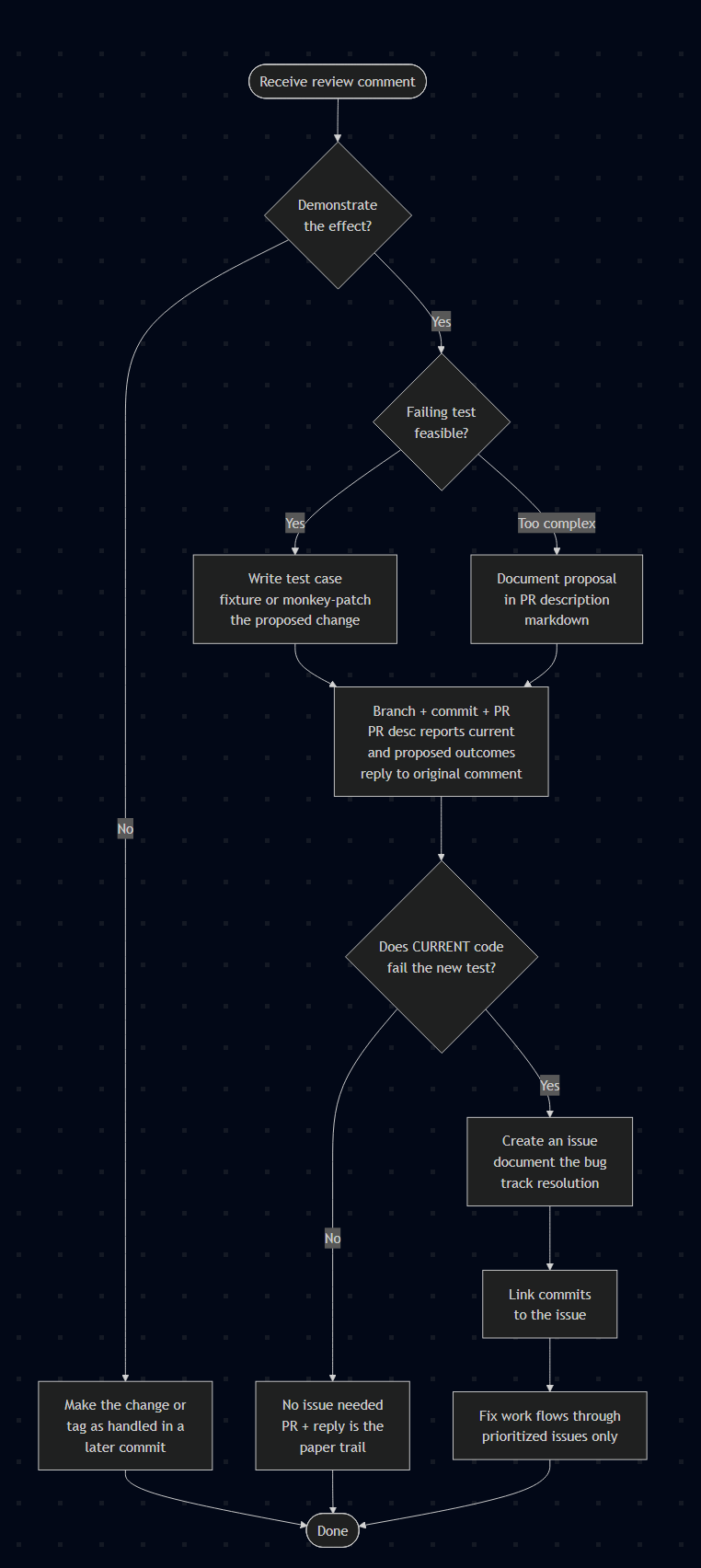
- Receive review comment
- Demonstrate the effect?
- No → Make the change or tag as handled in a later commit → Done
- Yes → Failing test feasible?
- Too complex → Document proposal in PR description markdown
- Yes → Write test case (fixture or monkey-patch the proposed change)
- Demonstrate the effect?
- Branch + commit + PR
- PR description reports current and proposed code outcomes
- Reply to original review comment with the PR link (and possibly the issue link)
- Does CURRENT code fail the new test?
- No → No issue needed; PR + reply is the paper trail → Done
- Yes → Create an issue (document the bug, track resolution)
- Link commits to the issue
- Fix work flows through prioritized issues only → Done
Mermaid Decision Tree:
Fix / Enhance / Do / Investigate. No conventional-commit prefixes (feat:, chore:, etc.).